Designing a Pro Digital Marketing Webinar Web Banner
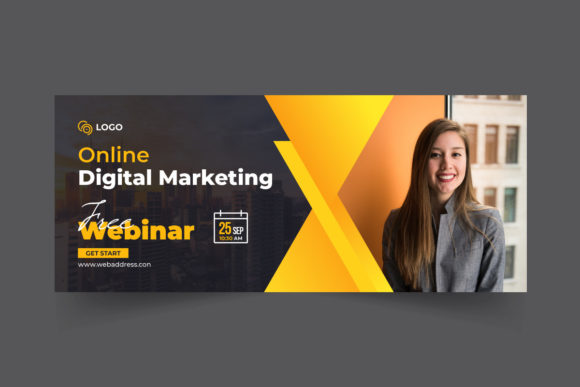
Imagine you have spent weeks preparing the perfect presentation. Your content is sharp, your speaker is engaging, and the value you offer is undeniable. Yet, when you share the registration link on social media or send out that email blast, clicks are scarce. Often, the missing link isn't the quality of your webinar itself, but the visual invitation used to promote it. A Digital Marketing Webinar Web Banner serves as the digital storefront for your event. It is the first thing potential attendees see, and in a split second, it determines whether they stop scrolling to learn more or keep moving past your offer.
In the crowded online space, generic templates rarely cut it. You need a design that communicates professionalism while standing out against the noise of countless other notifications. This is where a high-quality, customizable banner template becomes an essential tool for marketers, educators, and business owners alike. It bridges the gap between your great idea and the audience that needs to hear it.
Why Visual Quality Matters for Online Events
The primary purpose of a webinar banner is to capture attention and convey key information instantly. Unlike a printed flyer that someone might hold for a minute, a web banner competes for attention in a feed that moves at lightning speed. If the image looks pixelated, cluttered, or outdated, viewers subconsciously assume the webinar content will be the same.
This is why technical specifications like 300 DPI (dots per inch) are crucial, even for digital use. While screens typically display at 72 DPI, starting with a high-resolution source file ensures that your graphics remain crisp on high-definition monitors, retina displays, and large desktop screens. When you scale a banner for different platforms—say, from a website header to an Instagram story—having that high-resolution base prevents the dreaded blurriness that kills credibility.
Furthermore, working in RGB Color mode is non-negotiable for digital assets. RGB (Red, Green, Blue) is the color standard for screens, ensuring that the vibrant blues, energetic oranges, or professional grays you choose look exactly as intended on a laptop, tablet, or smartphone. Using the wrong color profile can result in dull, washed-out visuals that fail to excite your audience.
The Power of Customization and Ease of Use
One of the biggest hurdles for small business owners and freelancers is the belief that they need advanced graphic design skills to create professional marketing materials. This is where the value of a 100% customizable template shines. A well-structured file allows you to swap out text, change colors to match your brand identity, and adjust layouts without breaking the design harmony.
When a template uses free fonts, it removes a significant barrier to entry. You don't need to worry about purchasing expensive licenses or hunting down specific typefaces. Everything you need is accessible, ensuring that the final product looks cohesive and legal to use commercially. Whether you are a blogger promoting a solo masterclass or a corporate trainer advertising a team workshop, the ability to edit quickly means you can react to trends or last-minute schedule changes without hiring a designer.
The inclusion of a Flat Design aesthetic is another major advantage. Flat design focuses on simplicity, clean lines, and usability. It avoids unnecessary textures or complex shadows that can date a graphic quickly. This style is not only modern and appealing to today's internet users but also ensures that your message remains the focal point. The design supports the content rather than distracting from it.
Versatile File Formats for Every Need
A robust design package offers flexibility through multiple file formats. Receiving both EPS and JPEG files covers every possible use case you might encounter.
- JPEG: This is your ready-to-use file. It is universally compatible, lightweight, and perfect for immediate upload to social media platforms, email newsletters, or website sidebars. It requires no special software to view or share.
- EPS: This is the editable vector source file. If you have access to software like Adobe Illustrator, this format allows you to resize the banner to any dimension without losing quality. It is ideal for making significant structural changes or adapting the design for print materials like posters or brochures to complement your online campaign.
It is important to note that in most premium templates, the image is not included. This is actually a benefit. It forces you to choose photography or illustrations that are specific to your topic and brand. Instead of using a generic stock photo of people shaking hands that everyone else uses, you can select imagery that truly reflects your unique teaching style or industry niche.
Practical Applications Across Industries
The utility of a digital marketing webinar banner extends far beyond just the tech industry. Consider how different professionals can leverage this tool:
- Educators and Coaches: If you are teaching a course on "Financial Literacy for Beginners," a clean, trustworthy banner helps establish authority. You can use calming colors and clear typography to make the subject feel approachable rather than intimidating.
- E-commerce Entrepreneurs: Launching a new product? Host a live demo webinar. A vibrant, high-energy banner can create a sense of urgency and excitement, driving traffic to your registration page just before a launch.
- Non-Profit Organizations: Fundraising galas or awareness campaigns often rely on webinars to reach donors. A professional banner signals transparency and seriousness, encouraging people to invest their time and money in your cause.
- Freelance Creatives: Graphic designers or writers hosting a portfolio review session can use these banners to showcase their own eye for detail. The quality of the promotional material acts as a subtle proof of competence.
Key Considerations Before You Start Designing
Before you dive into editing your Digital Marketing Webinar Web Banner, take a moment to strategize. First, identify your primary platform. Will this banner live primarily on LinkedIn, where a more corporate tone works best, or on TikTok and Instagram, where bold colors and minimal text perform better? Knowing this helps you decide how much information to include in the main visual.
Second, keep the hierarchy of information in mind. The title of the webinar should be the largest element, followed by the date and time, and finally the call to action (e.g., "Register Now"). Do not try to cram every detail into the image; let the banner do the heavy lifting of grabbing attention, and let the landing page provide the specifics.
Finally, remember that consistency builds recognition. If you are running a series of webinars, use the same template structure but vary the colors or images for each session. This creates a visual thread that helps your audience instantly recognize your events in their feed, building a loyal community over time.
Ultimately, investing time in a high-quality, editable banner is an investment in your event's success. It ensures that your hard work in creating valuable content is matched by a presentation that demands attention. With the right tools—high resolution, easy editing, and versatile formats—you can create promotional assets that look like they came from a top-tier agency, all while maintaining full control over your brand message.