Evaluating the 10 Web Buttons Bundle for Professional Design Workflows
In the fast-paced environment of modern web development and digital marketing, time is often the most scarce resource. Professionals ranging from freelance developers to small business owners frequently find themselves needing high-quality interface elements without the luxury of designing them from scratch. This is where asset collections like the 10 Web Buttons Bundle enter the conversation. Rather than serving as a mere shortcut, this collection represents a strategic approach to maintaining design consistency while accelerating production timelines. For anyone tasked with building landing pages, e-commerce interfaces, or application dashboards, understanding the utility and limitations of such a bundle is essential for making an informed decision about its integration into your workflow.
The Core Value of Pre-Made Vector Assets
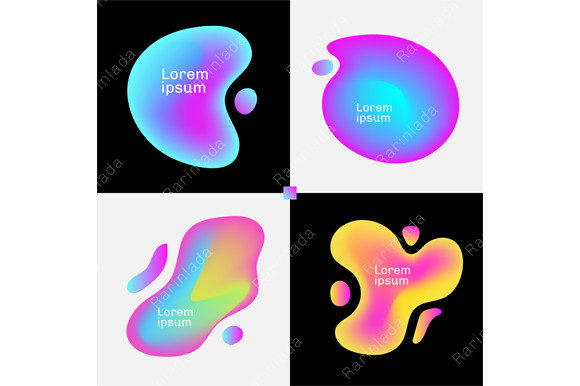
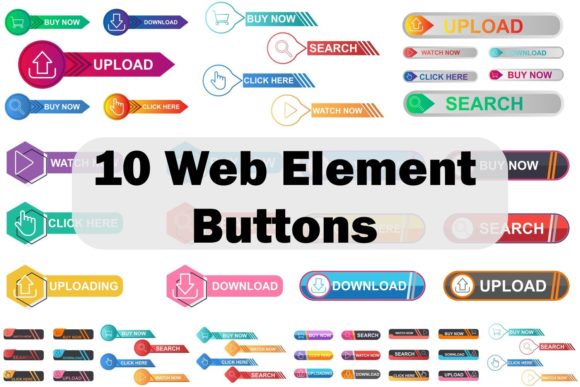
The primary appeal of the 10 Web Buttons Bundle lies in its foundation: vector graphics. Unlike raster images, which can become pixelated when resized, vector shapes maintain their crisp edges regardless of scale. This bundle includes 100 vector shapes that are fully resizable, a feature that cannot be overstated in its importance for responsive web design. Whether you are designing for a high-resolution retina display on a desktop or optimizing touch targets for a mobile device, these assets adapt seamlessly.
Beyond scalability, the bundle offers significant flexibility through its file formats. Users receive files in JPG, PNG, AI (Adobe Illustrator), SVG, and CMX (CorelDRAW). This variety ensures compatibility across different software ecosystems. For instance, a web developer might prefer the lightweight nature of SVG files for direct code implementation, ensuring fast load times and sharp rendering on all devices. Conversely, a graphic designer working in Adobe Creative Cloud can utilize the AI files to make granular adjustments to curves and gradients. The inclusion of CorelDRAW formats further broadens the audience, accommodating professionals who rely on that specific suite of tools.
Customization and Color Flexibility
One of the most critical aspects of any design asset is its adaptability to brand guidelines. A generic button that cannot be altered is rarely useful in a professional context. The 10 Web Buttons Bundle addresses this by offering "possible and easy change color" capabilities. Because the files are organized with layers and built as vectors, changing the hue, saturation, or brightness to match a corporate palette is a straightforward process.
This level of customization allows marketers and creators to maintain brand consistency without sacrificing the structural integrity of the design. Instead of forcing a brand to fit a template, the template bends to the brand. For entrepreneurs managing multiple projects with distinct visual identities, this means a single purchase can serve various clients or ventures, provided the base shapes align with the desired aesthetic. The ability to quickly iterate on color schemes also aids in A/B testing scenarios, where slight variations in call-to-action buttons can significantly impact conversion rates.
Technical Quality and File Organization
When evaluating digital assets, the organization of the source files often reveals the professionalism behind the product. This bundle boasts "100 Organized layers," a detail that speaks volumes about its usability. In complex design projects, messy layer structures can lead to frustration and errors. Well-organized layers allow designers to isolate specific elements—such as shadows, highlights, or text placeholders—making editing efficient and non-destructive.
Furthermore, the promise of "Print ready files" and "Transparent High resolution" outputs adds versatility to the bundle. While primarily intended for web use, the high-resolution nature of the source files means these buttons can also be utilized in printed marketing materials, such as brochures or business cards, without loss of quality. The transparent PNGs are particularly valuable for overlaying buttons onto varied backgrounds, ensuring that the design integrates smoothly without unsightly white boxes or jagged edges.
Real-World Application Scenarios
To understand the true value of the 10 Web Buttons Bundle, it is helpful to consider specific use cases. For a blogger or publisher launching a new site, these assets can provide an immediate polish to the user interface, reducing the need to hire a dedicated UI designer for basic elements. For educators creating online course materials, the clear, scalable buttons can enhance navigation within learning management systems, improving the student experience.
Freelancers and agencies often face tight deadlines where every hour counts. Having a library of 100 pre-vetted, high-quality button styles allows them to prototype interfaces rapidly. They can present multiple options to a client during the discovery phase, speeding up the approval process. Similarly, small business owners who manage their own websites can use these tools to refresh their site's look seasonally or for special promotions without needing deep technical knowledge of graphic design software.
Strengths and Practical Considerations
The strengths of this bundle are rooted in its comprehensiveness and format diversity. The sheer volume of 100 shapes provides a wide array of stylistic choices, from minimalist flat designs to more dimensional, glossy finishes. This variety increases the likelihood that a user will find a style that fits their specific project requirements. The inclusion of both raster (JPG, PNG) and vector (AI, SVG, CMX) formats ensures that the assets are future-proof; even if industry standards shift towards different vector formats, the foundational geometry remains editable.
However, practical usage does come with considerations. While the "easy change color" feature is a strong selling point, users should be aware that achieving a perfect match may still require a basic understanding of color theory and design software. Additionally, while 100 shapes offer variety, they represent a finite set. Highly specialized projects requiring unique, bespoke interactions might still need custom illustration. It is also important to note that while the files are print-ready, the primary optimization is for screen display, so users intending heavy print usage should verify the color profiles (CMYK vs. RGB) within the vector files before sending to a professional printer.
Long-Term Value and Workflow Integration
The long-term value of the 10 Web Buttons Bundle extends beyond the initial download. By establishing a library of reusable assets, professionals can standardize their output. Consistency in UI elements builds trust with users; when buttons behave and look predictable across a website, the overall user experience improves. This bundle serves as a reliable foundation for that consistency.
Moreover, the efficiency gained translates directly to cost savings. For freelancers billing by the hour, reducing the time spent on mundane tasks like drawing button states (normal, hover, active) allows more time to be spent on strategy, content, and complex problem-solving. For business owners, it reduces the dependency on external vendors for minor updates, granting greater autonomy over their digital presence.
Final Thoughts on Usability and Fit
In conclusion, the 10 Web Buttons Bundle stands out as a practical, high-utility resource for a broad spectrum of digital creators. Its strength lies not just in the quantity of assets but in the quality of their construction—organized layers, true vector scalability, and multi-format support. It is particularly well-suited for those who need to balance speed with professional aesthetics.
While it may not replace the need for custom design in high-end, bespoke applications, it offers an exceptional return on investment for startups, marketers, and developers looking to streamline their production pipeline. The ability to easily modify colors and resize without quality loss ensures that these assets remain relevant even as design trends evolve. For anyone looking to enhance their toolkit with reliable, versatile, and professionally structured interface elements, this bundle represents a sound and logical addition to their resource library.